The Coaching Chaos: Why Juggling 10 Different Apps Is Killing Your Team's Potential
Meta Description: Coaches lose countless hours managing disconnected tools like Google Sheets, Hudl, GroupMe, and GoodNotes. Learn how un-siloing player data, messaging, and video into a single system saves time and improves athletic performance.
Date of creation: 2026-08-13
Industry Focus: High School Athletics • Youth Academies • Collegiate Sports • Club Sports • Coaching & Operations
The Problem: The Modern Coach's Digital Nightmare
It's 10:30 PM on a Tuesday.
Coach Davis is sitting at his kitchen table after a long away game. The team won, but instead of unwinding, he's staring at a desktop screen surrounded by half-a-dozen browser tabs and a phone buzzing with notification badges.
He needs to answer three simple questions before tomorrow morning:
- Is our star guard clear to practice after her ankle tweak?
- Who led the team in transition defensive efficiency in the third quarter?
- What is the exact workout plan for the bench players tomorrow afternoon?
To answer the first question, he opens Text Messages to search through a chain of 45 unread messages from parents and trainers.
To answer the second, he opens Synergy, exports a spreadsheet to Google Sheets, cross-references it with his handwritten court notes in GoodNotes, and then manually updates the roster doc in Excel.
To answer the third, he jumps onto GroupMe to drop a screenshot of a workout routine he stored in his iPhone's Camera Roll, then drafts an Email to the admin staff to book the weight room.
By 11:45 PM, Coach Davis hasn't designed a single tactical play. He's just spent over an hour acting as a human copy-paste machine between six disconnected systems.
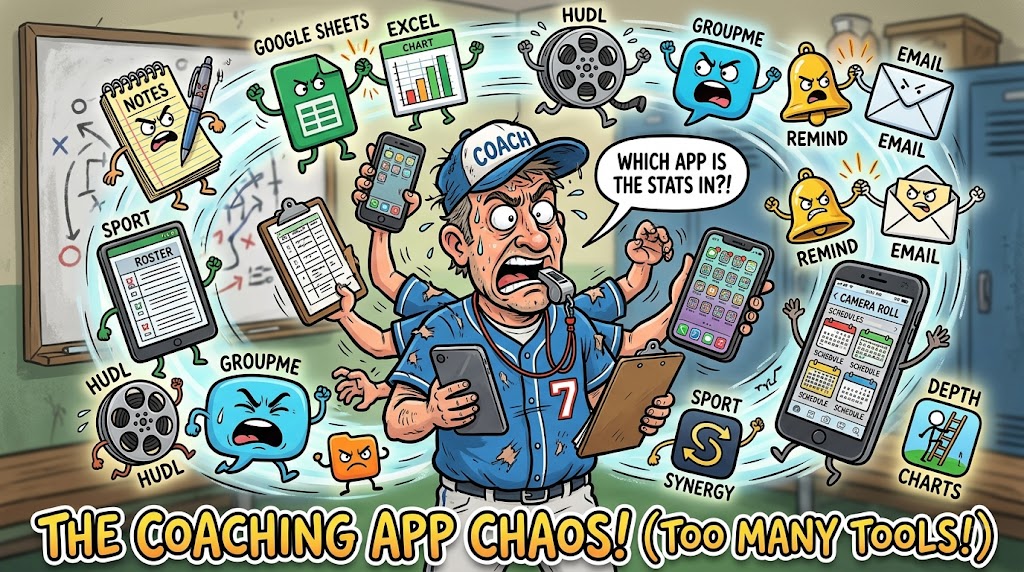
This is the hidden crisis in sports leadership today: The "Too-Many-Tools" Problem.
The Anatomy of a Fragmented Coaching Stack
Ask almost any high school, club, or collegiate coach to unlock their phone, and you will see a chaotic grid of single-purpose apps. Over the last decade, technology brought specialized solutions for every micro-task in athletics.
The catch? None of these systems talk to each other.
Coaches end up stuck in a web of disjointed platforms:
- Notes & Whiteboards: GoodNotes, Apple Notes, physical yellow legal pads.
- Player Rosters & Stats: Google Sheets, Excel, paper binders.
- Video & Film Analysis: Hudl, Sportscode, Synergy, phone video clips in group chats.
- Player & Parent Messaging: Text messages, GroupMe, Remind, WhatsApp.
- Schedules & Logistics: Camera roll screenshots, TeamSnap, Google Calendar.
- Workouts & Conditioning: PDFs, Sheets, third-party fitness apps.
- Playbooks & Tactics: Specific playbook apps, printed binders.
- Administrative Operations: Email, Google Drive, paper forms.
[GoodNotes] ──> [Google Sheets] ──> [Hudl]
     │                 │               │
     ▼                 ▼               ▼
[GroupMe]    ──>  [Camera Roll] ──> [Email]
When data lives in isolation, finding a single insight requires pulling down information from five different places.
The Real Cost of Information Silos
The damage caused by software fragmentation isn't just a matter of inconvenience. It directly impairs a team's ability to develop players and win games.
1. Massive Time Drain
Coaches spend hours performing manual administrative tasks—exporting, re-formatting, re-uploading, and messaging—time that should be spent on player development, video analysis, or personal well-being.
2. Miscommunication & Missed Signals
When scheduling updates live in a group chat, player notes live on paper, and injury reports live in an email, critical details fall through the cracks. A player gets cleared for practice in a text, but the strength coach working off yesterday's spreadsheet pushes them too hard in the gym.
3. High Context Switching Costs
Constantly switching between Hudl, Excel, GroupMe, and email leads to cognitive overload. Instead of focusing on deep tactical thinking, a coach's attention is constantly fractured across dozens of app interfaces.
4. Player Disengagement
Modern athletes expect simple, clean communication. When work spans four different communication apps and two spreadsheet links, athletes miss updates, show up with the wrong gear, or fail to review video assignments on time.
Example: The High School Baseball Coach
Consider PJ, a high school varsity baseball coach balancing a full-time teaching job with team management.
It's game day, and PJ needs to construct his starting lineup and pitching rotation based on recent workload, opponent handedness, and field conditions.
Here is what his process looks like under a fragmented workflow:
- Pull up Excel on his laptop to review season stats and recent plate appearances.
- Open Hudl on a tablet to check pitch counts and video clips from the previous game.
- Check Text Messages to review a note from the athletic trainer regarding a pitcher's shoulder soreness.
- Open the Notes App to re-draft the depth chart based on all three inputs.
- Screenshot the final lineup card from Notes and drop it into a Remind group chat so the team knows the batting order.
Now consider that same afternoon under a unified workflow:
PJ opens one platform. He selects the game, reviews integrated pitch counts and recent video clips alongside trainer notes attached directly to the player's profile, drags and drops the starting lineup, and publishes it directly to the team channel with a single click.
| Fragmented Workflow | Unified Workflow | | --- | --- | | Excel + Hudl + Texts + Notes + Remind = 45 Minutes | One Integrated System = 5 Minutes |
The Solution: Unifying Notes, Rosters, Video, and Messaging
The future of sports software isn't adding another specialized tool to a coach's phone. It's about bringing everything into one operational hub.
When software unifies notes, rosters, video clips, messaging, schedules, and analytics, the entire dynamic of a coaching staff shifts.
           ┌────────────────────────┐
           │   CENTRALIZED SYSTEM   │
           └───────────┬────────────┘
                       │
  ┌────────────┬───────┴───────┬────────────┐
  ▼            ▼               ▼            ▼
[Rosters]  [Video]        [Messaging]  [Schedules]
  │            │               │            │
  └────────────┴───────┬───────┴────────────┘
                       ▼
           [Unified Player Profile]
When these systems connect:
- Player Profiles Become Complete: Clicking on an athlete reveals their roster information, recent film clips, training attendance, health status, and direct message history in a single view.
- Context Travels with Communication: You can clip a 5-second video segment, attach a tactical note to it, and send it directly to a player or position group in the same interface.
- Schedules Stay Synchronized: Changing a practice time automatically updates the calendar, notifies players via integrated messaging, and adjusts the daily workout distribution without re-typing information anywhere.
From "Managing Apps" to "Developing Athletes"
Coaches didn't enter the profession to become data administrators, spreadsheet managers, or app troubleshooters. They got into coaching to teach, mentor, and build winning programs.
Consolidating your operational tech stack isn't just about saving a few minutes a day—it's about reclaiming your focus.
- For High School Programs: It eliminates late-night administrative work, giving coaches their personal lives back.
- For Club Sports & Academies: It creates a professional, unified experience for players, parents, and recruiters.
- For College & Elite Staffs: It removes friction between tactical coaches, athletic trainers, and strength coordinators, ensuring everyone acts on the same live data.
By eliminating software silos, coaches stop spending time navigating apps and start spending time developing players.
Key Takeaways
- Fragmented tools create hidden friction: Juggling 6 to 10 single-purpose apps causes cognitive fatigue, wastes time, and leads to critical miscommunications.
- Data silos hide important insights: When stats, injury updates, and video clips live in separate platforms, seeing the full picture of an athlete requires manual export work.
- Unified platforms save hours weekly: Bringing rosters, messaging, schedules, video, and notes into one system eliminates duplicate data entry.
- Better integration leads to better culture: Clear, centralized communication keeps athletes engaged, parents informed, and coaching staffs aligned.
- The ultimate goal is focus: Software should get out of the way so coaches can spend their energy on strategy, instruction, and athlete development.
Conclusion
The era of managing a sports team using a patchwork of spreadsheets, group texts, camera roll screenshots, and disconnected video software is coming to an end.
A coach's impact isn't measured by how well they manage eight different software subscriptions. It's measured by how well they prepare their athletes to perform under pressure.
By bringing every piece of your team's data—from film clips and rosters to practice notes and messaging—under a single unified roof, you eliminate administrative friction and give your staff the clarity needed to win.
Stop juggling tools. Start leading your team.